Yes, you can play OGraf templates live in OBS Studio, and it doesn't cost anything. OBS can't open an OGraf package on its own, but it can show the output page of a free OGraf server. You type a name and a title in a web page, press TAKE, and the graphic animates in on your stream. Below I explain why you'd want to, which tools can do it, and a step-by-step recipe. The first setup takes a few minutes. After that, you start the server and open the player in seconds.
The steps cover both Windows and macOS. Jump straight to the steps ↓
Download the free MOGRTizer OGraf Player →
Not familiar with Terminal, or scared of typing code? Paste the URL of this page into your favorite LLM and ask it to do it for you. I even asked Claude to create a shortcut icon on my desktop, so all I need to do is open OBS, double-click the icon, and I'm ready.
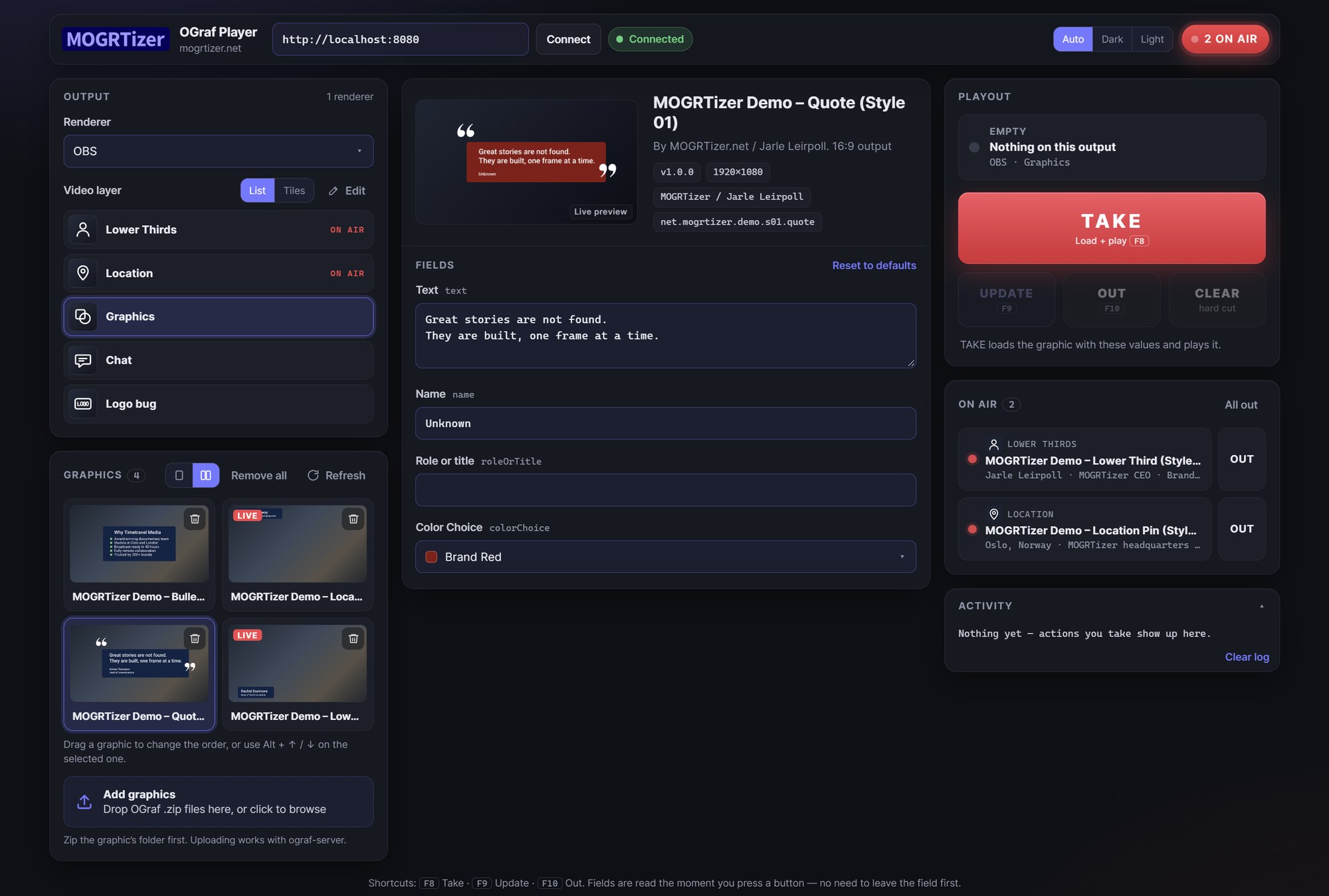
The MOGRTizer OGraf Player, my free controller. Made for OBS, and it should work with anything that can show a web page, though I have only tested it in OBS. Timetravel Media is a fictional demo company.
Why use OGraf graphics in OBS?
For me, the point is consistency. The lower third an editor uses in Adobe Premiere through a MOGRT can go out live in the same company's stream, with the same fonts, colors and animation.
OBS is the go-to tool for webinars, church services, school and company streams and small sports productions. Its built-in answers to lower thirds are a text source or a pre-rendered video with alpha. Both fall apart the moment a name changes, or when you need the same look in another application.
OGraf is an open standard from the EBU (European Broadcasting Union) for HTML-based graphics templates. One OGraf package holds the design, the animation, the fields the operator can edit, and the logic for playing in and out. Any application that speaks OGraf can play it, so you're not locked to one vendor. And because it's HTML, it renders sharp at any resolution, with transparency, in the browser engine OBS already has built in.
What are the options?
There are three free or almost free ways to get OGraf graphics into a live production. Here's how they compare from an OBS user's point of view.
ograf-server by SuperFly.tv + OBS Browser Source
Pros: Free and open source (MIT). The reference implementation from the people behind the OGraf tooling. Dropdowns stay dropdowns, and Update works while the graphic is on air. Any web page can control it, so the controller can look the way you want.
Cons: No installer — it runs on Node.js. The built-in controller is basic. No rundown or playlist.
SPX (SPX Solo)
Pros: Built for OBS, vMix and CasparCG. Proper rundowns, layers and a polished UI. Reads OGraf since version 1.4.
Cons: OGraf support is young. In my test, dropdowns became text fields, "&" showed as "&", and Update on air didn't work. Free from source code; the ready-made app costs $59.99.
CasparCG
Pros: Professional playout server with SDI and NDI output. Free and open source.
Cons: Overkill for most OBS users. Getting its output into OBS means NDI and a plug-in. Check its current OGraf status before you choose it.
My pick: ograf-server. It's the one that played my first template as designed, including live updates. If you need a rundown with many graphics lined up, look at SPX, and keep an eye on its OGraf support as it matures.
How do I set up OGraf in OBS?
Steps 1–4 are a one-time setup.
What you need
- OBS Studio — free from obsproject.com.
- Node.js — free from nodejs.org. It runs the OGraf server.
- MOGRTizer OGraf Player — my free controller.
- An OGraf graphic as a .zip file, with the graphic's folder at the top of the zip.
- The fonts your graphic uses, installed on the computer that runs OBS. For Adobe Fonts: in Creative Cloud Desktop, click the Fonts icon (f), then Install family. Keep Creative Cloud Desktop running and signed in, and restart your browser and OBS afterwards.
1. Install OBS Studio and Node.js
Download OBS Studio from obsproject.com and the LTS version of Node.js from nodejs.org. Install both with the default settings. You only do this once.
Already have Node.js? Check the version. Open a terminal. On Windows, press the Windows key, type cmd and press Enter. On macOS, open Terminal from Applications › Utilities. Then type node -v and press Enter. If you get "not recognized" or "command not found", Node.js isn't installed yet. If the number is lower than the LTS version on nodejs.org, install the LTS version.
2. Download and build ograf-server
- Go to github.com/SuperFlyTV/ograf-server, click Code → Download ZIP, and unzip it.
- Open a terminal in that folder. Windows: open the folder in File Explorer, click the address bar, type
cmdand press Enter. macOS: open Terminal, typecd(with a space after it), drag the folder into the window, and press Return. - Type these two lines, pressing Enter after each. The first one takes a few minutes, but only the first time:
npx --yes corepack yarn install
npx --yes corepack yarn build
3. Add the output to OBS
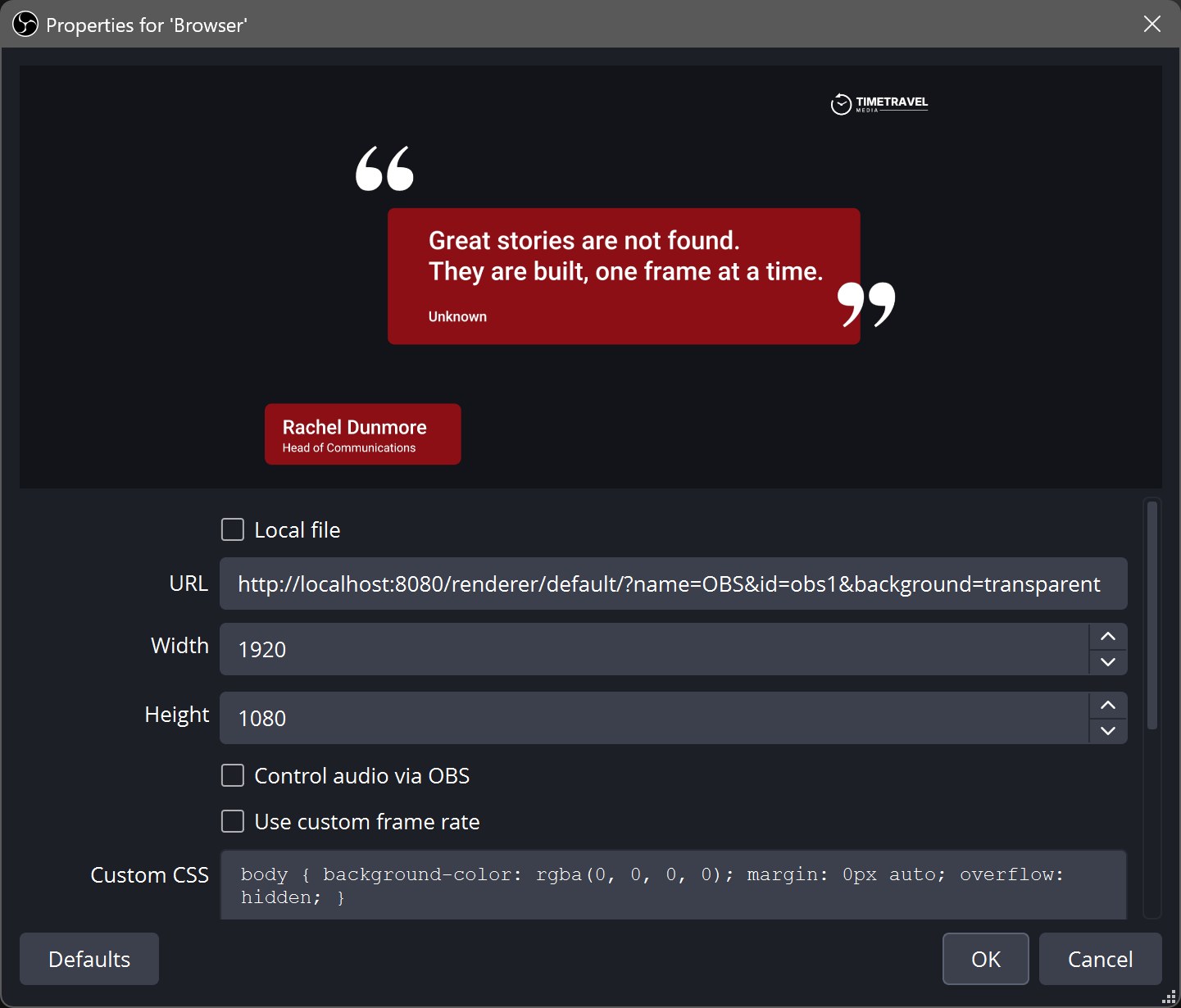
In OBS, click + under Sources, choose Browser, give it a name, and use these settings. Clear the URL field before you paste, so OBS's default address doesn't stay in front of it.
- URL:
http://localhost:8080/renderer/default/?name=OBS&id=obs1&background=transparent - Width / Height: 1920 / 1080
- Shutdown source when not visible: Off
- Refresh browser when scene becomes active: Off
- Custom CSS: Leave the default. It makes the background transparent.
The id=obs1 part gives OBS a fixed name, so the player recognizes it every time you start.
4. Get the player
Download MOGRTizer OGraf Player for free. It's one HTML file with a short user manual. Double-click it to open it in your browser — a current Chrome or Edge.
How do I test it?
5. Start the server
In the ograf-server folder, open a terminal as in step 2 and type npx --yes corepack yarn start. Leave the window open while you're live; closing it stops the server.
6. Upload your graphic
In the player, drop your zip on Add graphics, or click it to browse. It shows up in the list right away. No graphic of your own yet? The player comes with a sample: drop Sample graphic/sample-lower-third.zip on Add graphics.
7. Check the connection and do a test run
Under Output, Renderer should say OBS. If it's empty, OBS isn't reaching the server: check that the server window is still open and that the URL is exact, then select the Browser Source in OBS and click its Refresh button.
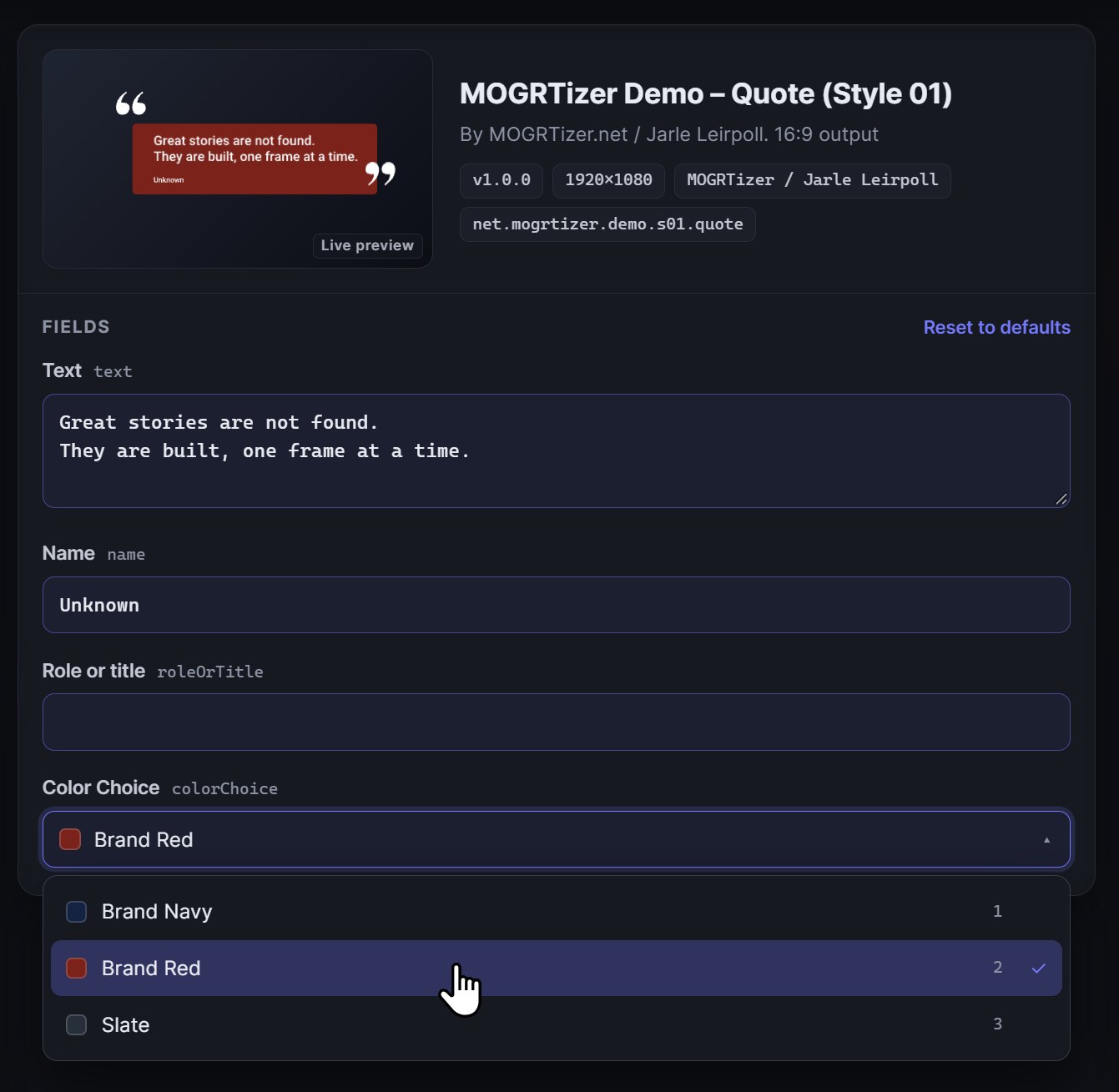
Click a graphic, fill in the fields, and press TAKE. Change the text and press UPDATE. Press OUT to end. If it all shows up in OBS, you're ready.
The fields come from the template itself, so dropdowns show the template's own choices — for example, the brand's colors.
How do I go live?
- Start the server (step 5), then OBS.
- Open the player and check that Renderer says OBS.
- TAKE to go on air, UPDATE to change it, OUT to end.
The keyboard works too: F8 is TAKE, F9 is UPDATE and F10 is OUT. CLEAR removes the graphic at once, with no out animation.
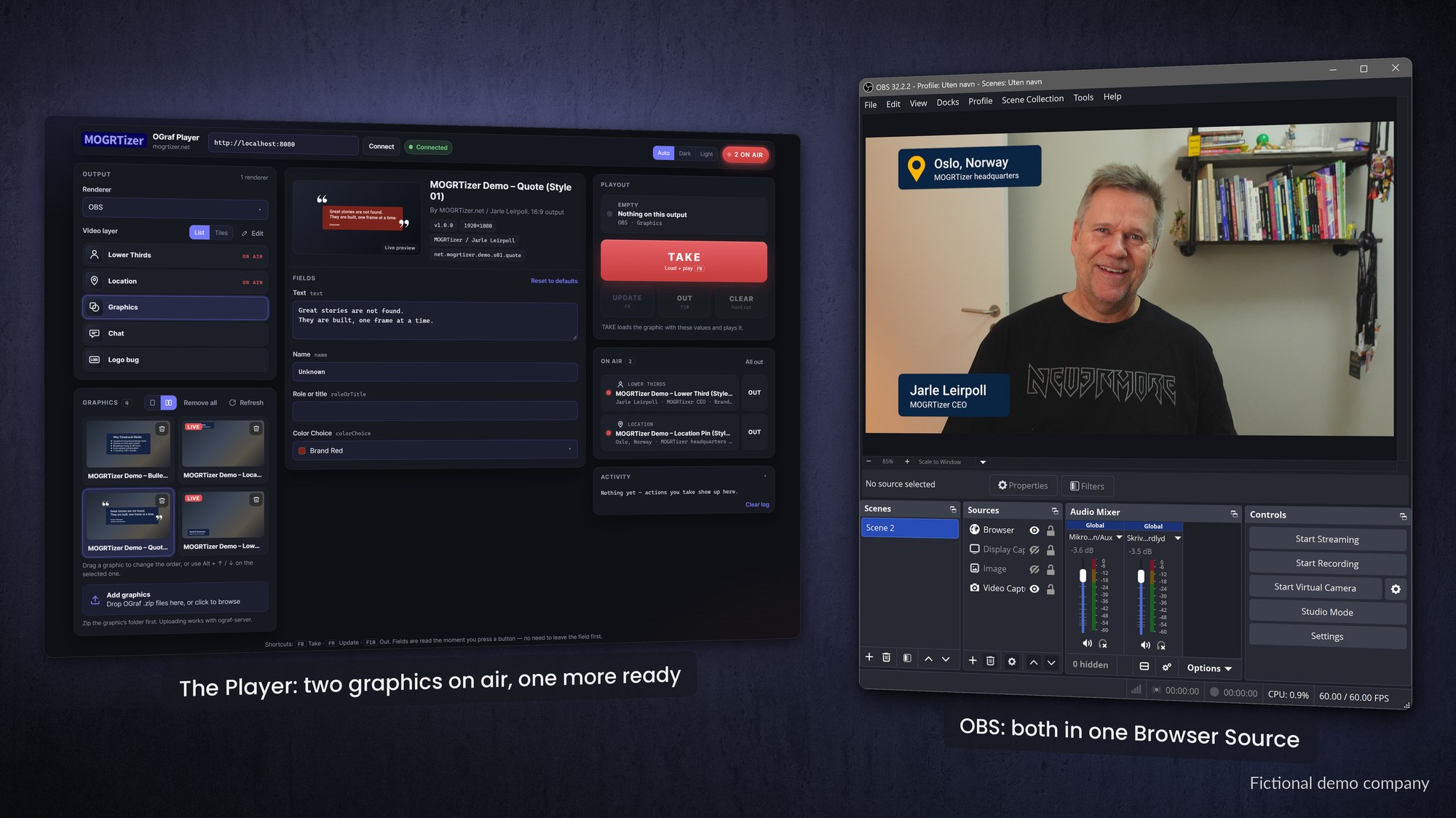
Need multiple graphics at the same time, like a location pin, a logo bug and a lower third? Choose a template, then a video layer, and press TAKE. Then choose another layer and template, and press TAKE. There are five layers, named Lower Thirds, Location, Graphics, Chat and Logo bug until you change them.
Under Edit you can rename each layer, give it an icon, and show the layers as a list or as tiles. Higher layers are drawn on top, and each graphic stays on air until you press its own OUT under On air.
Drag a template in the list to change the order. Switch between one and two columns, and drag the dividers between the three panels to make them wider or narrower.
Where do OGraf templates come from?
The EBU publishes example graphics with the specification. Loopic is a browser-based template builder with OGraf export. If you live in After Effects, StreamShapers Ferryman converts After Effects and Lottie animations to OGraf.
Every MOGRTizer template package includes both: MOGRTs for Adobe Premiere (26.0 or newer), and OGraf graphics for live production and DaVinci Resolve (21.1.2 or newer), with the same brand lock. If you want your graphics in both worlds, contact me.
Demos and videos worth watching
- OGraf live demos (ograf.ebu.io) — example graphics you can try in your browser.
- SPX tutorials – SPX to OBS (Meniac) — getting a graphics controller's output into OBS.
- Using OGraf with SPX and Loopic (SPX Graphics) — building and playing OGraf graphics.
- Using an OGraf created with After Effects and StreamShapers Ferryman (StreamShapers) — the After Effects route.
Frequently asked questions
Can OBS Studio play OGraf templates?
Yes, but not on its own. Add a Browser Source that points to an OGraf renderer, such as the free ograf-server from SuperFly.tv, and control the graphics from your browser.
Is it free?
Yes. OBS Studio, Node.js and ograf-server are all free and open source, and MOGRTizer OGraf Player is free too. SPX is free from its source code; its ready-made app is paid.
What URL do I use in the OBS Browser Source?
With ograf-server running on the same computer: http://localhost:8080/renderer/default/?name=OBS&id=obs1&background=transparent. Set the size to 1920 × 1080.
Why doesn't my OGraf graphic show up in OBS?
Check that the server window is open, that the player lists your OBS renderer, and that you pressed TAKE. If OBS reloaded the page, press TAKE again.
I updated a graphic, but OBS still shows the old one. Why?
OBS keeps a graphic it has already shown until its page reloads. The MOGRTizer OGraf Player reloads it for you after an upload when nothing is on air. Otherwise, press Reload output now in the player, or select the Browser Source in OBS and click its Refresh button. Both take everything off air.
Why is the text in the wrong font?
The graphic uses the fonts installed on the computer that runs OBS. If a font is missing, the text is shown in the Roboto font instead, and the MOGRTizer OGraf Player shows a yellow warning with the font's name. Install the font, then restart your browser and OBS. For Adobe Fonts, adding or activating a font is not enough, it must be installed: click Install family in Creative Cloud Desktop, and keep Creative Cloud Desktop running and signed in.
Is OGraf the same as a MOGRT?
No. A MOGRT is Adobe's template format for Premiere, made in After Effects, and used in editing. OGraf is an open HTML format for live and web graphics. The same design can exist in both.
Can I make OGraf templates from After Effects?
Yes, with converters such as StreamShapers Ferryman, or by having them built for you.