Premiere plug-in
From HD to UHD without retyping a single title
Every MOGRTizer template comes in an HD and a UHD edition. Resolution Swap moves every text, color, menu choice and checkbox from one version of your edit to the other, so the second version is done in one click.
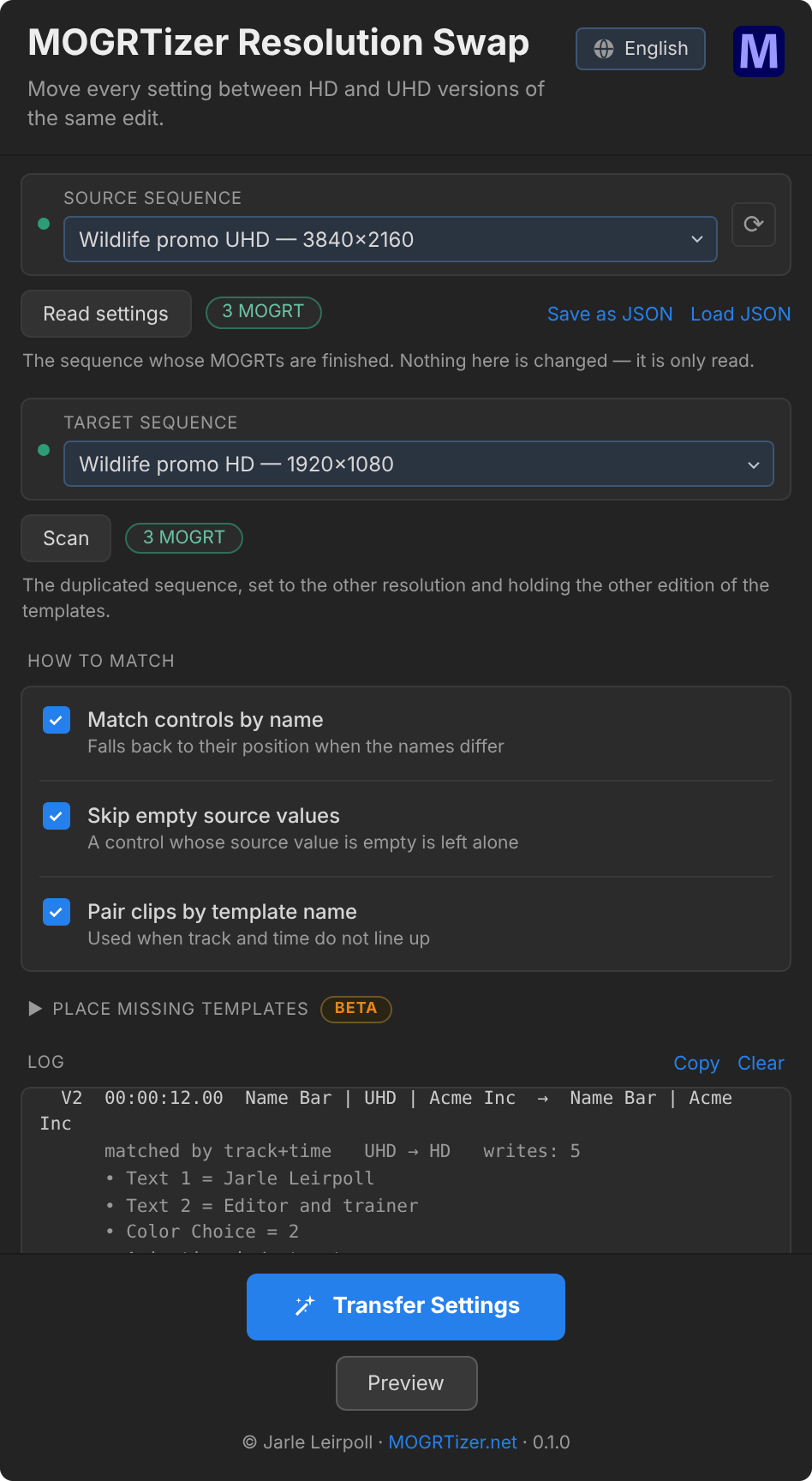
The HD version is approved. Now they want it in UHD
The edit is finished and signed off in HD. Then the next email arrives: "We need a UHD master as well."
If you used the UHD versions of the MOGRTs, with "Scale to 50%" active, you're good. You can just un-tick the checkbox, and your templates are now UHD. Use the Batch Sync plugin to do this in bulk, changing all the templates on the timeline in one go.
But maybe you used the HD version of the templates, because your system struggles a bit with 4k/UHD. So you duplicate the sequence and change it to 3840×2160. The cut survives. The graphics don't — every template has to be swapped for its UHD edition, and every name, title, color choice and menu setting typed in again. The retyping takes an afternoon, and it's the part where mistakes slip in.
Resolution Swap does the retyping for you.
What does Resolution Swap do?
Resolution Swap is a panel for Adobe Premiere. It reads every MOGRT setting in the finished sequence and writes the same values into the matching templates in the other version of the edit — HD to UHD, or UHD to HD.
The finished sequence is only read, never changed. You see a preview of every value before anything is written.
How does it work?
- Read the finished sequence. Pick it as the source and click Read settings.
- Scan the new version. Pick the duplicated sequence — set to the other resolution and holding the other edition of the templates — and click Scan.
- Preview, then transfer. Preview lists every clip and every value. Transfer Settings writes them. Changed your mind? Undo Last Transfer puts everything back.
How does it know which clip is which?
A duplicated sequence keeps every clip on the same track at the same time, so that is what Resolution Swap looks for first. If a clip has been nudged, it pairs by template name instead. Inside each clip, controls are matched by name — the HD and UHD editions are built from the same controls, so the names are the same.
Anything it can't pair is listed in the log, never guessed at.
What do I need?
- Adobe Premiere 26.0 or newer, Windows or macOS.
- MOGRTizer templates in both editions — HD and UHD come with every package.
- Included with every MOGRTizer template package.
- Install steps in the Guides.
A UXP version of this plugin will be available once Adobe has achieved full feature parity for UXP plugins in Premiere.
FAQ
Frequently asked questions
Does it change my original sequence?
No. The source sequence is only read. Everything is written to the target sequence.
What if the new sequence has no templates in it yet?
Open Place missing templates (beta). It places the other edition of each template on fresh tracks above everything, from your folder of .mogrt files. Your original clips are left alone unless you choose to remove them.
Why doesn't Ctrl/Cmd + Z undo a transfer?
Premiere's own undo doesn't see changes made by an extension. Use Undo Last Transfer in the panel. It goes one transfer back.
What about the Scale to 50% for HD setting?
It only exists in the UHD edition. Going UHD to HD it has nowhere to go, and the log says so. Going HD to UHD it keeps its default.
Get Resolution Swap with your templates
Every MOGRTizer package comes with Resolution Swap, Batch Sync, the Timeline Plotter and the free Safe Zones MOGRT. Your colors, your fonts, every aspect ratio — in HD and UHD.